Accessibility
Adjust the site to what works best for you. Your choices are saved in this browser only.
Software development
Appointments App
Online appointments for public institutions.
About the project
To get a document from a public institution, you leave home knowing nothing: whether the counter is open, which one you need, how long the queue is and whether the papers you are carrying are the right ones. You take time off work, wait forty minutes on a chair in the corridor and only then find out you needed something else, or that the clerk who handles it is on holiday.
On the other side, the institution has everyone busy at the same time in the morning and empty counters in the afternoon. Nobody knows how many people will come today. Booking by phone does not fix anything: someone has to answer the phone and write in a diary, and nobody else ever sees that diary.
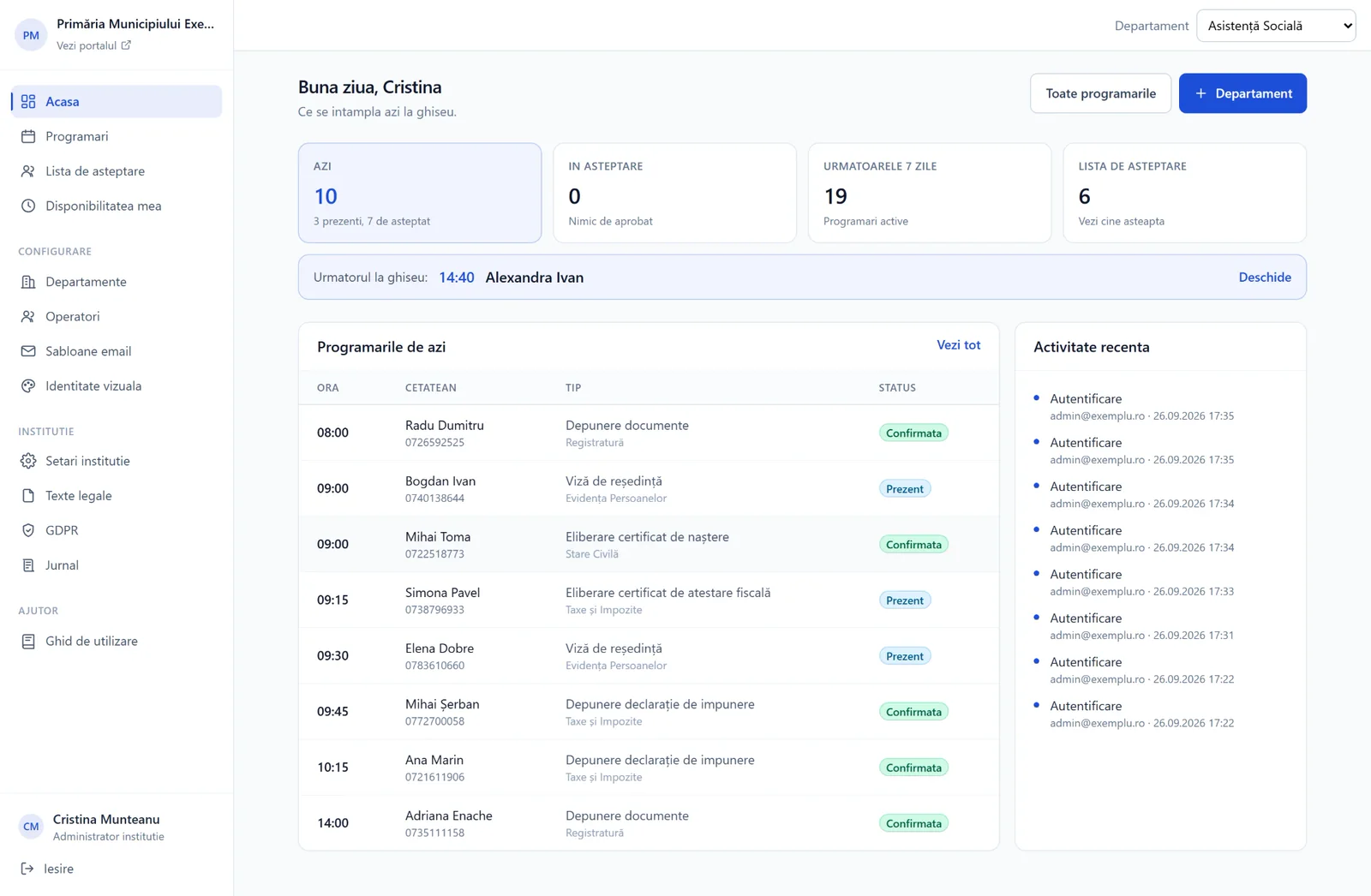
The app moves the decision before the trip. Citizens go to the institution's portal, choose what they need to get done, see the slots that are actually free and receive an email confirmation with the time, the counter and the documents to bring. The institution sees its day in advance and plans its people around it.
It is a multi-tenant platform: any number of instances can be created from a central panel, and each public institution gets its own public portal, its own departments, its own operators and its own visual identity. They are not copies of the app, but one platform that holds them all, with their data kept strictly apart.
It does not replace anything the institution already has. It does not keep population records, does not issue documents, does not connect to the registry and needs no integration. It solves exactly one problem, booking citizens at the counter, and solves it completely.
Citizens choose what they need to do, not the department
Is a birth certificate issued abroad transcribed at Civil Status or at Population Records? The answer differs from one institution to another, and citizens have no way of knowing it. Any portal that starts with "choose the department" puts the burden of knowing the institution's org chart on them, and when they get it wrong they make the trip for nothing.
The first question is "what would you like to get done", and the list of services is searchable and grouped by counter. The department follows from the service chosen; nobody is asked for it. The search also covers department names, for those who already know where they want to go, and the full list stays visible below, because a good part of a public institution's visitors do not type into search boxes.
Free slots are calculated, not managed
Nobody enters slots by hand. The system derives them from the department's opening hours, intersected with the availability each operator declares, minus the appointments already made, minus closed days and the public holidays set by the institution.
Each appointment type has its own length, so a one-hour window produces two slots for a thirty-minute service and a single one for a one-hour service. The institution can require a minimum notice, so it does not get bookings fifteen minutes ahead, and a limit on how far into the future people can book.
Nobody loses a slot because someone else clicked faster
When two citizens open the same slot at the same time, one of them has to find out before believing they are booked. The slot is checked again at the moment of confirmation, and if it was taken in the meantime the citizen is sent back to the calendar with a clear message, not left with an appointment that does not exist.
When a day fills up completely, the waiting list appears. If someone cancels, the place is offered automatically to the first person in line, by email, with a link valid for a limited time. If they do not confirm, the offer expires and moves on to the next person, without anyone at the office keeping track of it.
The institution asks for exactly the information it needs
Each appointment type can have its own extra fields: the document number, the country that issued it, the type of certificate, a box for a legal representative. They belong to the service, not to the department, because "marriage appointment" and "document transcription" need different things, and a form that asks for everything is a form people abandon halfway.
Operators see the answers before the person reaches the counter, so they can prepare the file in advance. Answers are saved together with the question's label at the time of booking, so an appointment from six months ago still shows exactly what was asked then, even if the field has since been renamed or deleted.
Each institution has its own portal, not a page with a different logo
The display name, logo, browser tab icon, colour palette and font are set in the interface, per institution, and can be refined down to department level. The portal, the emails and the panel take on that identity automatically.
Colours are not left to chance: every combination is checked automatically against the WCAG standard, and the administrator sees the contrast report for text, background and buttons on the spot. A public service has to stay readable for everyone, including people with poor eyesight, and a colour picked in a moment of enthusiasm cannot make the portal illegible.
Emails go out on their own, in the institution's words and at the right time
Confirmations, approvals, rejections, cancellations, invitations and reminders are sent automatically. The text of each one can be rewritten from the panel, with variables for name, date, time and counter, and if the institution does not change it, the platform's default is used.
The time is always the institution's time. Each instance declares its time zone and the conversion accounts for daylight saving, so a reminder set for two hours before really arrives two hours before, even on the weekend the clocks change. Each notification is sent exactly once, however many attempts the system makes.
One institution's data never reaches another
The separation between instances is not a convention but a rule applied to every query, in the data access layer. There is no way for a route to read data without passing through the institution filter, and operators can be further limited to their own departments.
The public portal is open to anyone, so it is treated accordingly: rate limiting per address, strict validation of all incoming data and answers checked against the real configuration on the server, not against what the browser sends.
Deleting on request really deletes
For a GDPR request, the operator searches by email address and first sees exactly what will be deleted and which future appointments will be cancelled, before pressing anything. Deletion removes the appointments, waiting list entries, invitations and notification history.
The activity log is not deleted but anonymised. A public institution has to be able to prove what happened and when, and that traceability cannot be lost together with the personal data. Consent is recorded with every appointment, with the time and the version of the text accepted.
A new institution goes live the same day
The instance is created from the central panel, the portal address is set and an invitation goes to the first administrator, who chooses their own password. From there, departments, appointment types, working hours, operators, legal texts and visual identity are all configured in the interface, without a line of code and without anyone from the platform stepping in.
The platform administrator can enter any instance at any time, with full rights, to help with setup or fix a problem, and return to the central panel without signing in again.
Built to be verifiable, not just to work
The app is covered by more than four hundred automated server-side tests and an end-to-end suite that walks through the real flows in a browser: a citizen's booking, an operator's approval, a cancellation with a reason, inviting an outside expert and the waiting list. Every behaviour promised above has a test that fails if it stops being true.
Our team built this platform for our partner ADVANCED COMMUNITY SOFTWARE.
Maintenance & support
After launch, we keep looking after the platform.
We provide complete, continuous technical maintenance, proactive 24/7 monitoring and specialised IT support for Appointments App, the multi-tenant platform public institutions in Romania use for counter appointments. Our services keep the public citizen portal, the central multi-tenant panel, the automated notifications and the real-time booking system running without interruption.
The technical maintenance and IT support package includes:
- Proactive 24/7 monitoring of platform availability and response times (99.9% uptime)
- Advanced cybersecurity, protection against attacks and strict GDPR compliance
- Automated, secure backups of the multi-tenant databases and activity logs
- Continuous optimisation of server performance, database queries and real-time slot availability checks
- Automated checks against the WCAG accessibility standards (colour contrast and legibility)
- Regular software updates, security patches and preventive maintenance
- Dedicated technical support with guaranteed response times (SLA) for the operators and administrators of public institutions
The maintenance and IT support services cover the platform our team built for our partner ADVANCED COMMUNITY SOFTWARE.
- Proactive 24/7 maintenance
- Guaranteed 99.9% SLA
- Data security & GDPR
- Multi-tenant cloud
- Backup & cloud management
- WCAG accessibility audit
- Dedicated technical support
Next project
Custom Ticketing App
White-label ticketing for public institutions