
Accessibility
Adjust the site to what works best for you. Your choices are saved in this browser only.
Software development
Field Sales Order App
Order taking for field sales reps.
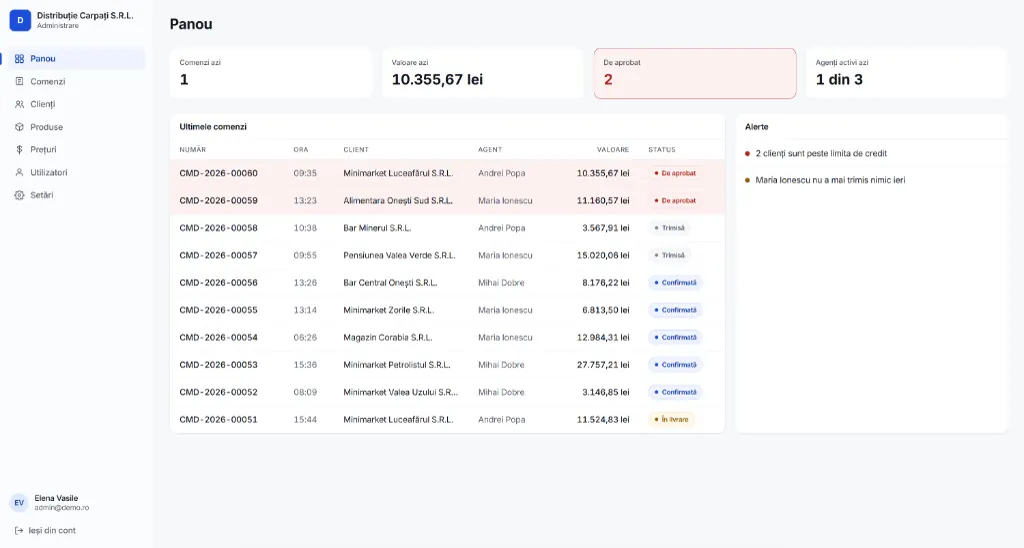
Presentation demo
You can try the app in a demo version with sample data, meant only for presentation.
About the project
In a distribution company, between the moment a sales rep promises goods in a shop and the moment the order reaches the system, usually six to twenty-four hours go by. The order is written in a notebook, dictated over the phone or sent on WhatsApp, and in the evening someone at the office types it into the invoicing software by hand.
In that window orders get lost, quantities are misread and products are promised that are no longer in stock. The customer finds out only the next day that they will not get what they were promised, and the office pays for hours of retyping every day that adds nothing.
The app closes that window. The rep enters the order straight from the phone, in front of the customer, with the right stock and price on screen. The order lands instantly in the office's central list, ready to check and export to the invoicing software. Nobody retypes anything.
It is designed for the real context of the job, not for an office: someone standing in a shop, phone in one hand, talking to the customer while entering the order, with eight to twenty visits a day. Every interface decision starts from there.
It sits next to the company's existing systems, not on top of them. It does not replace the ERP, does not issue invoices, does not do accounting and needs no integration. It solves exactly one problem, taking orders in the field, and solves it completely.
It works completely without internet
The signal is missing exactly where it is needed: in shops, in warehouses, in basements. Any solution that needs a permanent connection is abandoned on the second day and the rep goes back to the notebook. Here, the catalogue, customers, prices and stock are downloaded to the phone at sign-in. Reps take orders in airplane mode, without a single error message, just as if they were online. Orders join a queue and go out on their own when the signal returns. Even if a sync is interrupted halfway or the phone retries, the same order never reaches the system twice.
A complete order in a few minutes, not a quarter of an hour
In distribution, orders repeat to a large extent from one visit to the next. The app opens the customer's last order by default, with last time's products and quantities already filled in, and the rep only adjusts what has changed. Each product has its quantity buttons right in the list, without an extra add-to-cart step. Products can be ordered by the piece, the case or the pallet and the conversion is automatic, so reps order in the unit they think in and the warehouse receives the quantity in the unit it works in.
The right stock and price, for each customer
The price shown is the real one for that customer, from their own price list, not a generic list price. A corner shop and a chain each see their own price, without the rep searching through tables or calling the office. Stock is visible on every product, clearly marked as available, low or out of stock. When a quantity exceeds the stock, the rep is warned on the spot, before promising anything. And if the local data is more than a few hours old, the app says so openly instead of pretending to know.
Everything to know about a customer, before selling
Each customer's card shows the outstanding balance and the credit limit, with a bar that turns red when the limit is exceeded. Reps see in advance whether they can still deliver or need to talk to the office, instead of finding out after they have promised. The same card holds the delivery notes that usually live only in people's heads, like "mornings only" or "use the back entrance", plus the history of previous orders, so the rep knows what worked and what did not with this customer.
Full control at the office, in real time
Orders appear in the admin panel the moment they are sent. They can be filtered by day, rep, customer or status and searched freely, and the ones that need attention, such as customers over their credit limit, are highlighted automatically. The office can correct an order, change quantities or prices and move it through its stages, from sent to delivered. Every change is recorded with its author and time, so it is always possible to reconstruct what changed and who changed it.
Data goes in and out without headaches
Customers, products and prices are loaded from Excel files, with the columns matched on screen and a clear report of problem rows before anything is saved. Stock is updated from a two-column file, in an operation that takes a few seconds and can be done daily. At the other end, orders are exported in the format the invoicing software expects, with the right diacritics and decimals. The total the rep sees on the phone is identical, to the cent, to the one in the file that reaches accounting.
Nothing gets lost
The order in progress is saved on the phone with every change. If the battery dies or the app closes, the order is still there when it reopens, with every line entered. And once sent, an order stays exactly as it was. Prices and names are frozen at the time of the order, so an order from the spring looks the same a year later, even if products have since become more expensive or been renamed.
A new company is up and running in a single day
The name, logo, colours, currency, VAT rate, order numbering and the stock and credit rules are set in the interface, not in code. Together with loading the data from Excel, a new company can start working the same day the decision is made.
Next project
La Muscadelle
Website for a historic estate in France